


1. What is a CFD Position Experience Voucher?
A CFD Position Experience Voucher is a margin bonus provided by the platform, allowing you to open trial positions in the CFD contract market. When you use an experience voucher, the system will open a position for you at market price in the designated market, with specified leverage and position value. You can close the position, set take profit and stop loss, and perform other actions just as you would with a regular position. This lets you try CFD contract trading at zero cost—any losses are covered by the platform.
Key Features
| Feature | Description |
|---|---|
| Zero-cost trial | Margin is provided by the platform |
| Losses covered by platform | Profits are yours; losses are offset by the bonus. The bonus can only offset losses up to the bonus amount; any excess losses must be covered by you |
| Fee deduction | The bonus can be used to offset opening fees, swap fees, and losses when closing the position (up to the bonus amount) |
| Automatic recovery upon expiry | When the position expires, the system will automatically close it at market price and recover the bonus |
Usage Restrictions
- Only one experience position per market: For the same asset, such as gold (XAU), regardless of leverage, you can only hold one experience position
- Multiple markets allowed: You can use experience vouchers in different markets (such as XAU, S&P 500, etc.)
- Bonus cannot be transferred: The bonus for experience positions is for trading only and cannot be transferred to other accounts
2. How to Use a Position Experience Voucher (Web)
Viewing Position Experience Vouchers
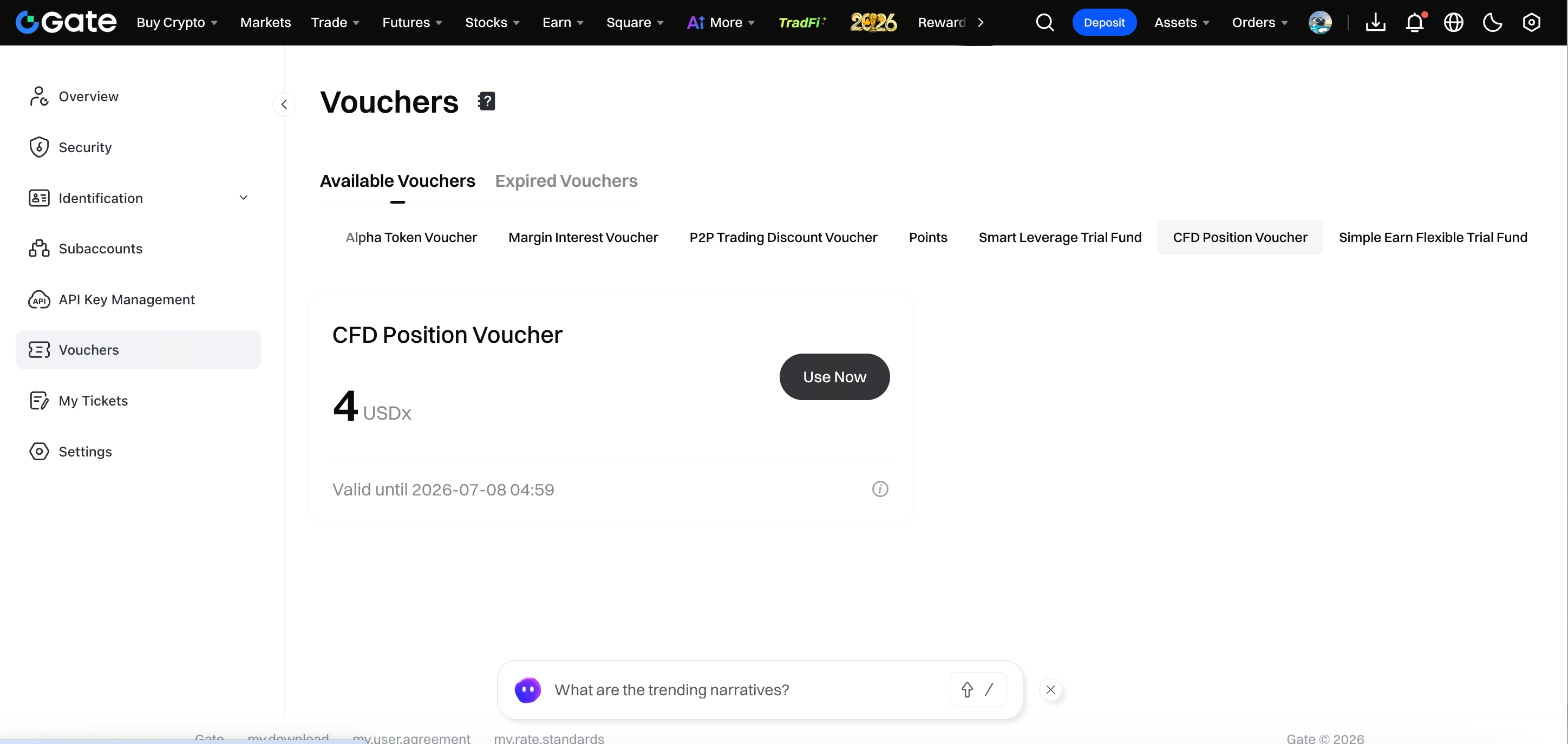
Step 1: You can view your vouchers under [Coupon Center] - [CFD Position Experience Voucher]. Click [Use Now] to jump to the CFD trading page and open the position popup.
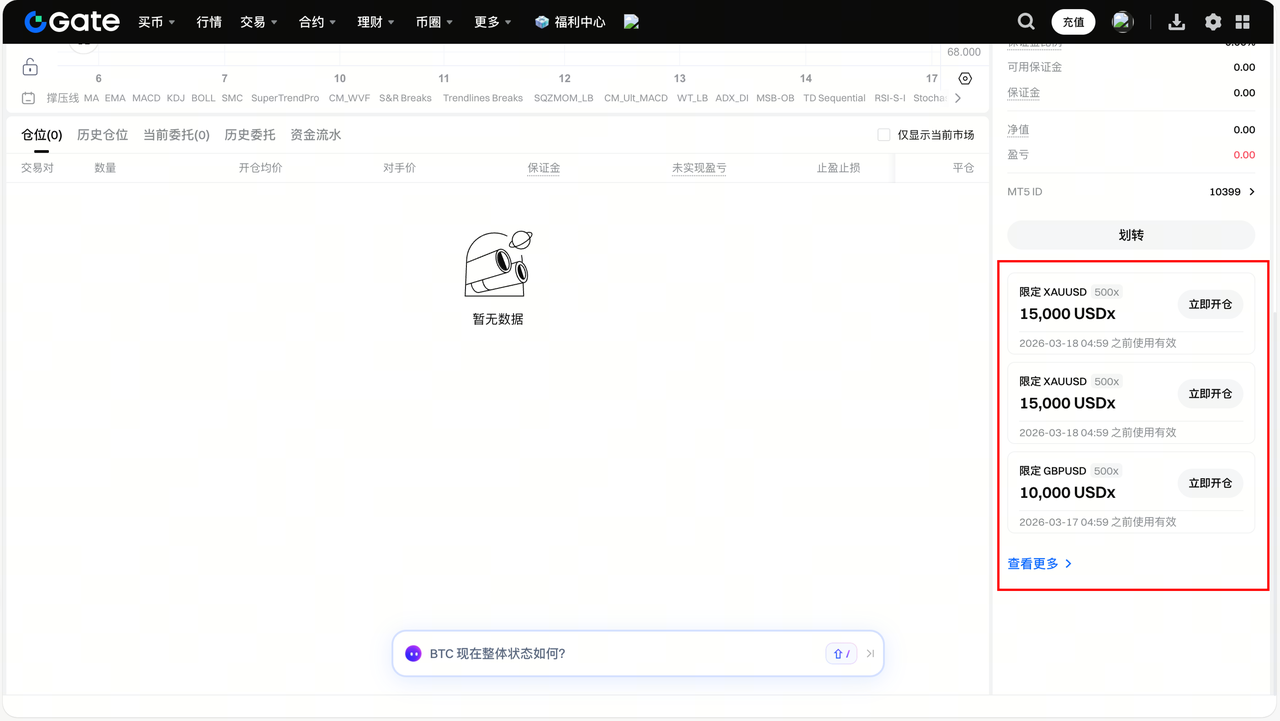
Step 2: On the CFD trading page, there is also a quick access to experience vouchers at the bottom right under [Assets Area], showing up to 3 vouchers. To view all vouchers, click [View More] to go to the Coupon Center.
Using Position Experience Vouchers
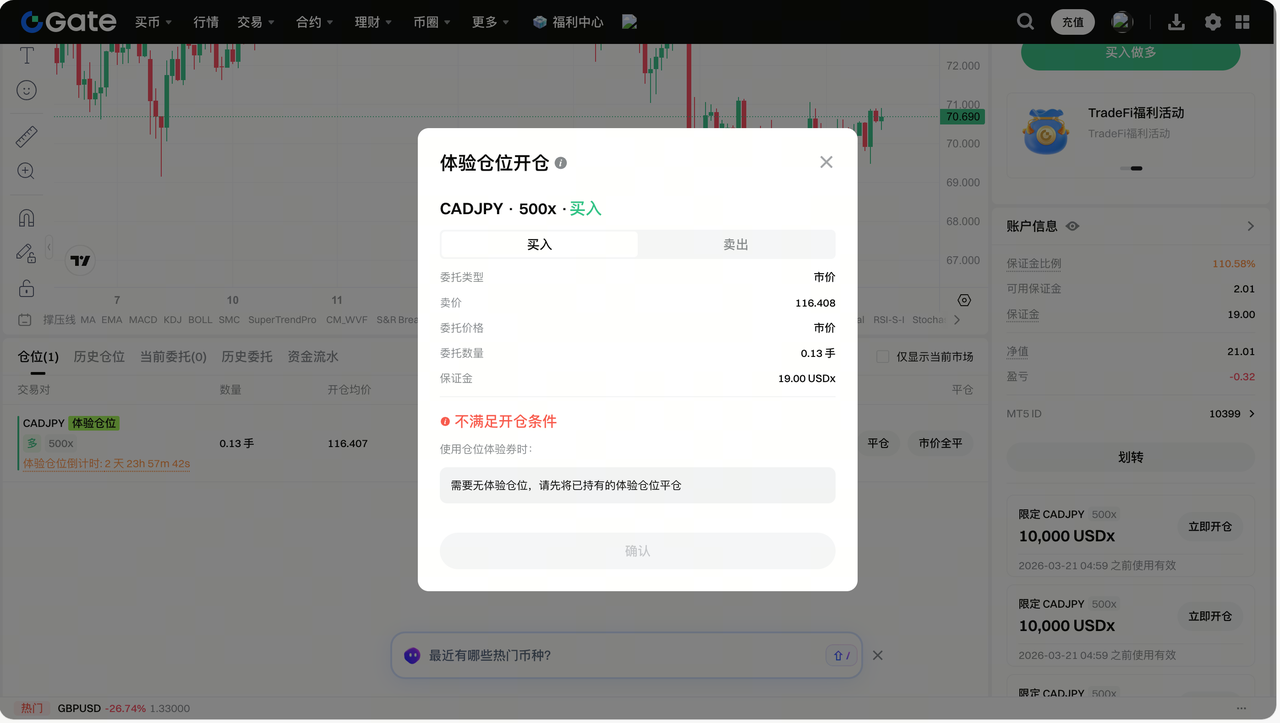
Step 1: Before use, ensure you have activated a TradFi account and do not have an experience position in the market. If you haven’t activated a TradFi account, clicking [Use Now] will prompt you to activate it. If you already hold an experience position in the market, you must close it before using the voucher.
Step 2: After clicking [Use Now], select the position direction in the popup: Long or Short. The order price is market price, and the order quantity is calculated by the system based on the bonus and leverage. Actual filled quantity may vary.
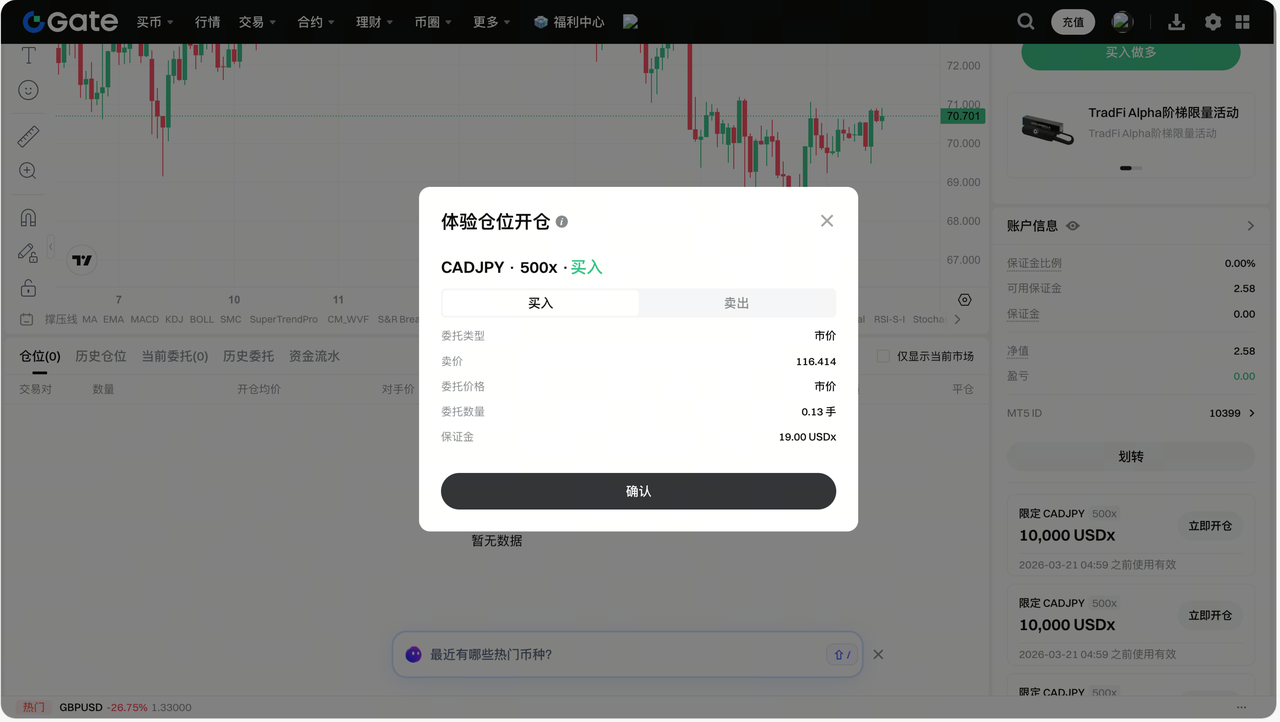
Step 3: After meeting the conditions, click [Confirm] to complete the operation. The position is opened at market price, and the system will try to match the position value to the voucher amount. If there is unused bonus due to market fluctuation, the system will immediately recover it.
Step 4: After successful use, you will have an experience position, distinguishable by the [Experience Position] tag and countdown timer.
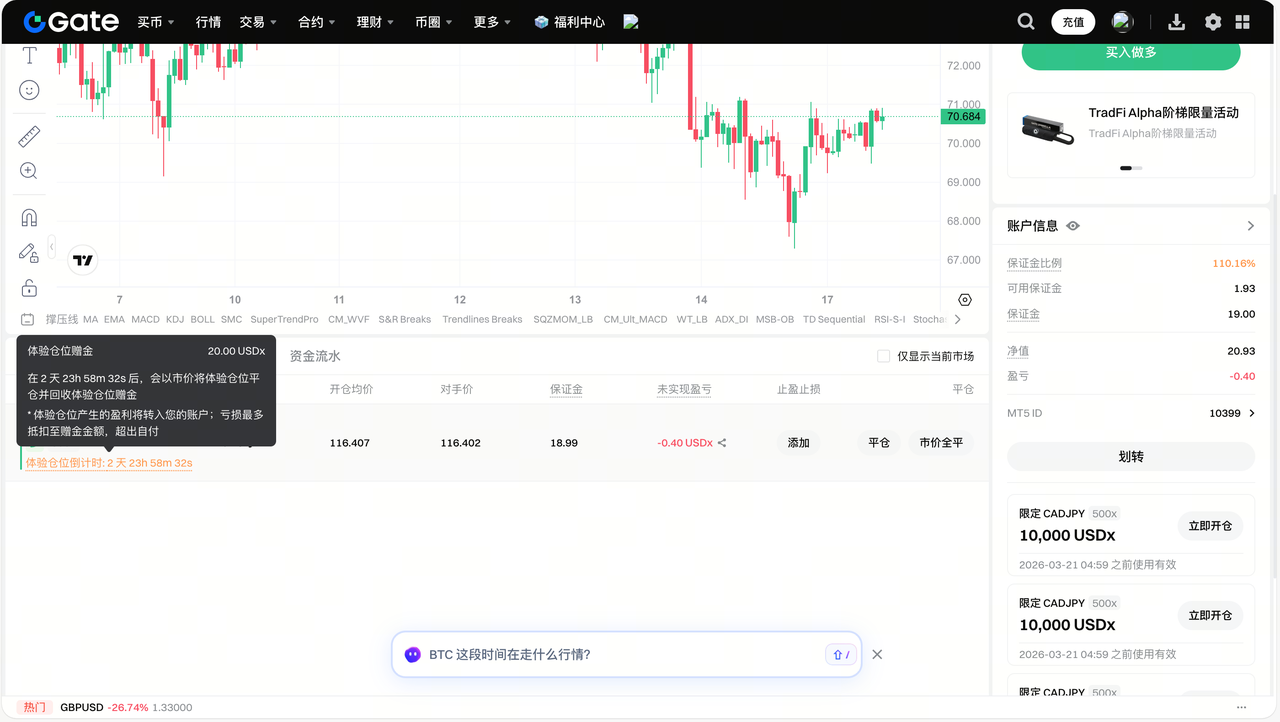
Step 5: The actions available for experience positions are essentially the same as regular positions, including setting take profit, stop loss, and closing the position.
3. How to Use a Position Experience Voucher (App)
Viewing Position Experience Vouchers
Step 1: You can view your vouchers under [Coupon Center] - [Position Experience Voucher]. Click [Use Now] to open the position popup.
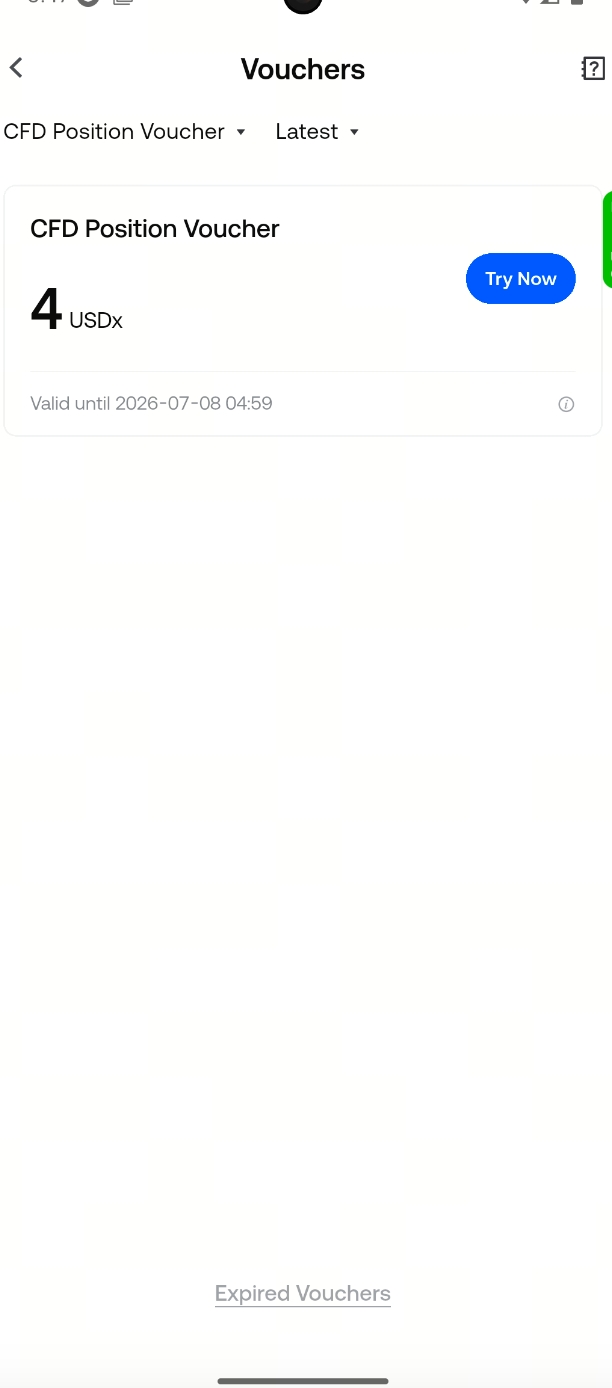
Step 2: On the CFD trading page, you can also find a quick access to experience vouchers under [More] - [Available Coupons].
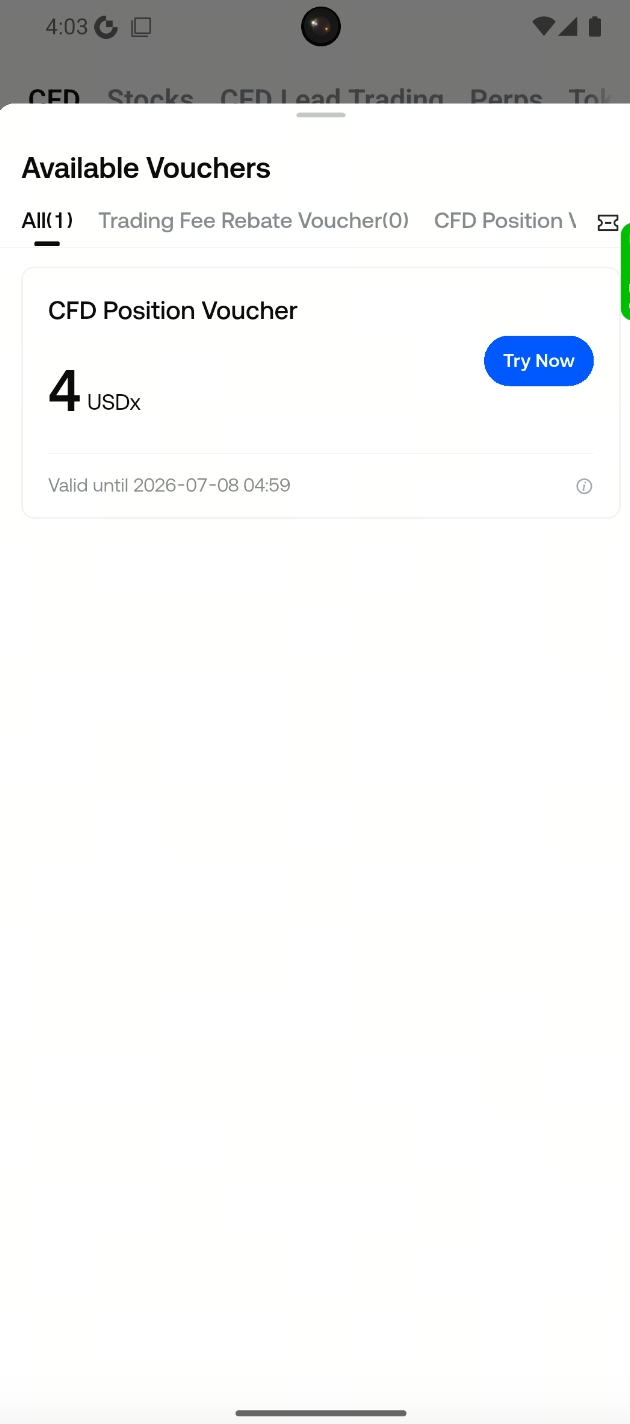
Using Position Experience Vouchers
Step 1: Before use, ensure you have activated a TradFi account and do not have an experience position in the market.
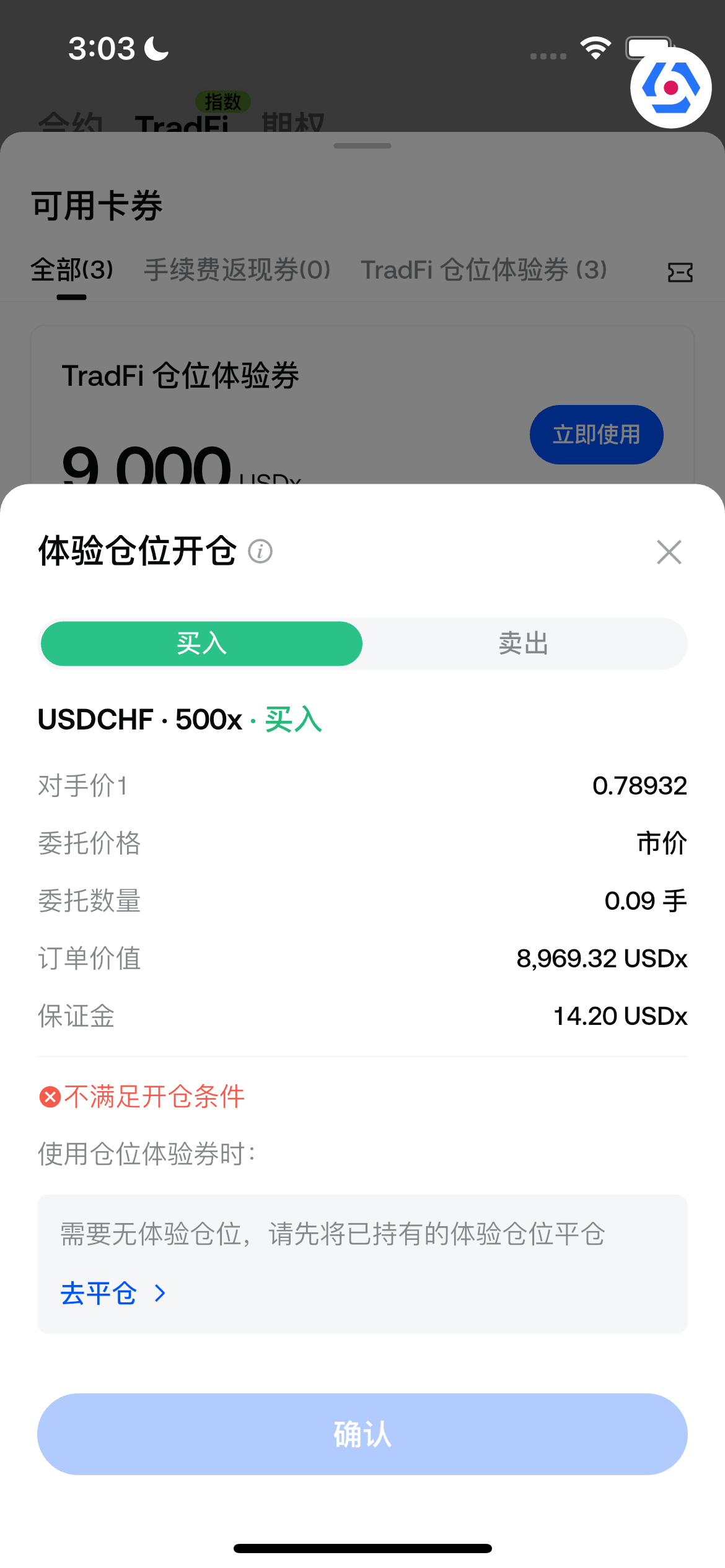
Step 2: After clicking [Use Now], select the position direction in the popup: Long or Short. The order quantity is calculated by the system based on the bonus and leverage. Actual filled quantity may vary.
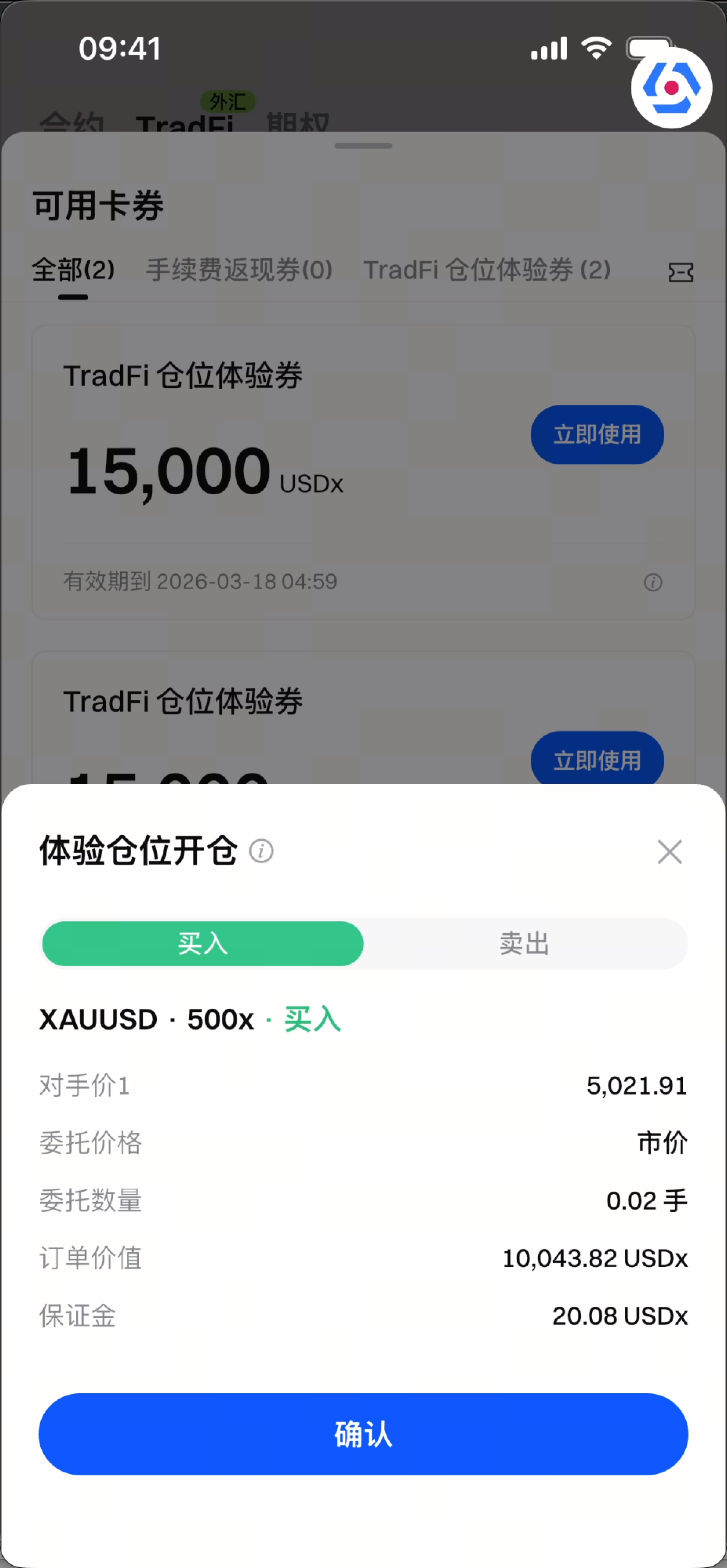
Step 3: After meeting the conditions, click [Confirm] to complete the operation.
Step 4: After successful use, you will have an experience position, distinguishable by the [Experience Position] tag and countdown timer.
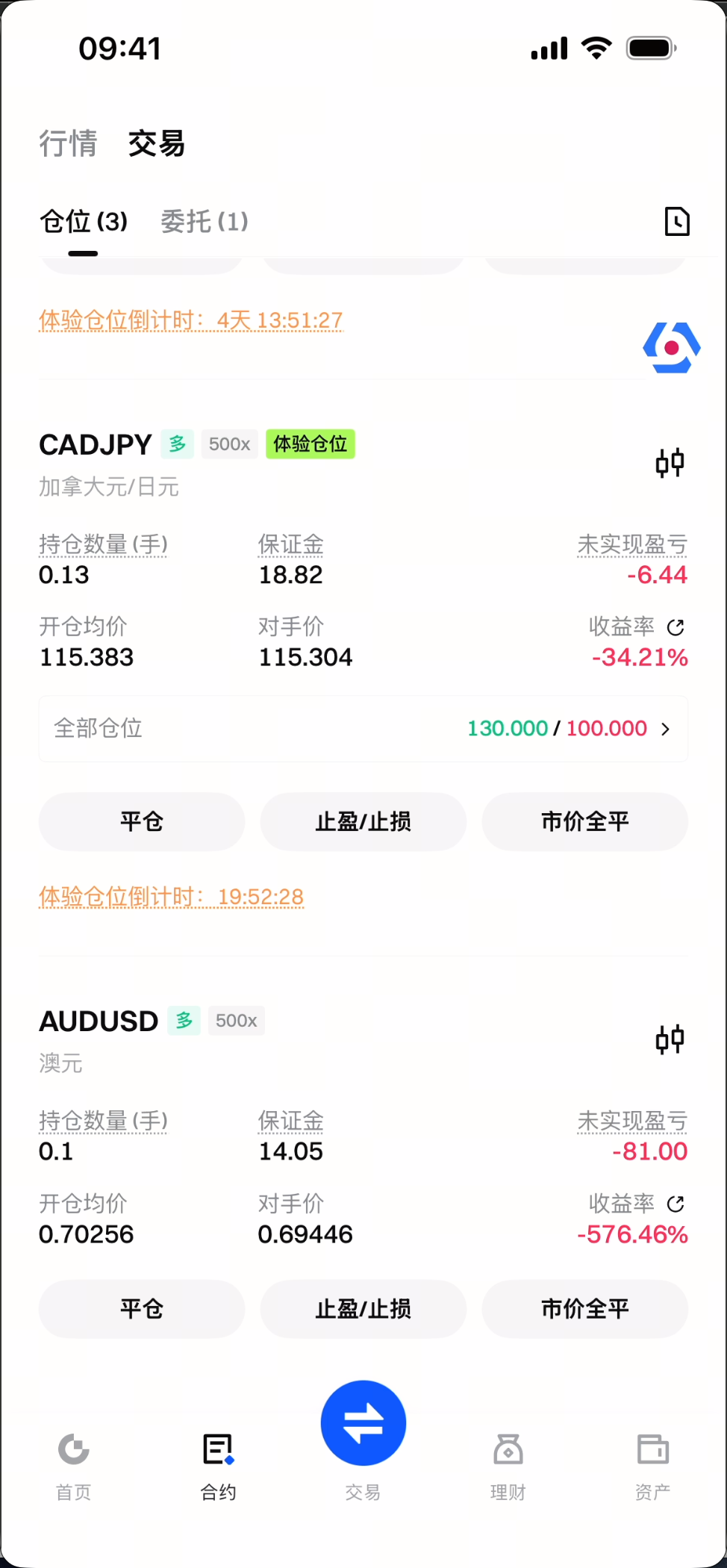
Step 5: The actions available for experience positions are essentially the same as regular positions, including setting take profit, stop loss, and closing the position.
4. Position Experience Voucher Trading Rules and Deduction Instructions
Trading Rules
- Position experience vouchers can only be used in the specified CFD contract market and must use the leverage specified on the voucher to open positions at market price.
- Only one experience position per market; you can hold experience positions in different markets simultaneously.
- Upon expiry, the system will automatically close the position at market price and recover the bonus.
- The countdown is calculated by trading days, excluding non-trading days. If the expiry time coincides with an early market close due to a holiday, the system will adjust the closing time to before the holiday close. For details on early market closures, please refer to the announcements in the Announcement Center.
- The system will notify you by site message 1 hour before expiry. Please manage your position in time.
Deduction Instructions
-
When opening a position: The bonus can be used to offset opening fees. If there is unused bonus after opening, the system will immediately recover it.
-
When closing a position: The bonus will first offset losses (including opening fees, partial close P&L, swap fees). Any bonus not used to offset losses will be recovered. Profits will be automatically credited to your account.
-
The bonus can only offset losses up to the bonus amount: For example, if the bonus is 10 USDT and your loss is 50 USDT, only 10 USDT can be offset; the remaining 40 USDT excess loss must be covered by you.
-
The bonus can only be used once when opening an experience position. If the bonus is not recovered promptly at closing, the system will automatically perform the recovery task, and you may see multiple recovery records.
5. Important Notes
When using a CFD Position Experience Voucher, please pay attention to the following:
- Prerequisites: You must have activated a TradFi account; no experience position in the same market; market must be open (cannot use during non-trading hours).
- Trading restrictions: Experience positions cannot change leverage or increase position size; bonus cannot be transferred.
- Market volatility: Positions are opened at market price; actual filled quantity may vary. Extreme market conditions may cause opening failures—please try again later as prompted.
- Closing and deduction: Losses are offset by the bonus when closing. The bonus can only offset losses up to the bonus amount; any excess loss must be covered by you. Profits are credited to your account.
- Validity period: Experience vouchers have an expiry date. The trial position generated after using a voucher will have a closing countdown. When the countdown ends, the system will automatically close the position and recover the bonus.
6. Frequently Asked Questions
Can position experience vouchers be transferred?
No. Experience vouchers are exclusive to your account and cannot be transferred to other accounts.
Why can't I use a position experience voucher?
Please check:
- If you have activated a TradFi account;
- If you already hold an experience position in the market (must be closed first);
- If the market is open (cannot use during non-trading hours).
What happens when the experience position expires?
The system will automatically close the position at market price and recover the bonus. If there is a profit, it will be credited to your account; if there is a loss, it will be offset by the bonus. The bonus can only offset losses up to the bonus amount; any excess loss must be covered by you.
Can I hold multiple experience positions at the same time?
Yes. You can use experience vouchers in different markets, but only one experience position per market. For example, you can simultaneously hold experience positions in the XAUUSD and XAGUSD markets.
Can the bonus from experience positions be transferred out?
No. The bonus for experience positions is for trading only and cannot be transferred. Any attempt to transfer will be blocked.
What should I do if I get the message "The market is highly volatile, please try again later" when opening a position?
During extreme market conditions, price volatility may affect the available position size. Please try clicking [Open Position] again later.
Why does the position value not match the voucher amount after opening?
- Opening fees are deducted, consuming part of the bonus;
- Market fluctuations may prevent the entire bonus from being used for opening. Actual filled quantity may vary. (Unused bonus will be immediately recovered)
When using a voucher, I get a message about non-trading hours. How can I check trading times?
You can check detailed trading times for each market in the Contract Info section on the K-line page.
What happens to experience positions when the market closes early for holidays?
During holidays, some CFD contracts may close early. Please check the Announcement Center for details. If the expiry closing time coincides with an early market close, the system will adjust the closing time to before the holiday close.
Why was my experience position automatically closed?
Experience positions have a time limit. When the countdown ends, the system will automatically close the position and recover the bonus. The system will notify you by site message 1 hour before expiry; please manage your position in time.
Why are there multiple recovery records in my transaction history?
When you use a position experience voucher, you receive a bonus for the trial position. The bonus can only be used once when opening the position and will be checked for loss deduction at closing. If not needed for loss deduction, it will be recovered. Multiple recovery records may occur in the following scenarios:
-
If there is unused bonus at the time of opening, it will be recovered immediately.
-
If you make a profit at closing, the bonus is not needed for loss deduction and will be recovered.
-
If the bonus is not recovered promptly at closing and you have no position, the system will automatically perform the recovery task, resulting in multiple recovery records.
Disclaimer
The content provided herein is for reference and educational purposes only and does not constitute any financial, investment, trading, or legal advice, nor does it constitute an offer or solicitation to buy or sell any digital assets. Gate makes no express or implied representations or warranties regarding the accuracy, completeness, or timeliness of the information contained herein. Product features, interfaces, rules, and fee structures may be updated or adjusted at any time. Please refer to the latest announcements and the actual information displayed on the Gate platform for the most accurate details.
Digital asset investments involve significant risk, and prices may fluctuate substantially. You may lose the entire amount of your investment. Please make decisions cautiously based on your own financial situation and risk tolerance after fully understanding the associated risks. If necessary, you are advised to consult an independent professional financial or legal advisor.
For more information about potential risks, please refer to Gate's Risk Disclosure and User Agreement.
