


Applicable Instructions
This article applies to: Gate Web
Before you begin: Make sure you have registered a Gate account and can receive both SMS and email verification codes.
Estimated time: 3 minutes
Objective
This guide will walk you through how to bind or change your email address on Gate Web.
Email Binding
Step 1: Go to the Email Settings Page
- Log in to your Gate account.
- Click on your profile icon in the upper right corner of the page.
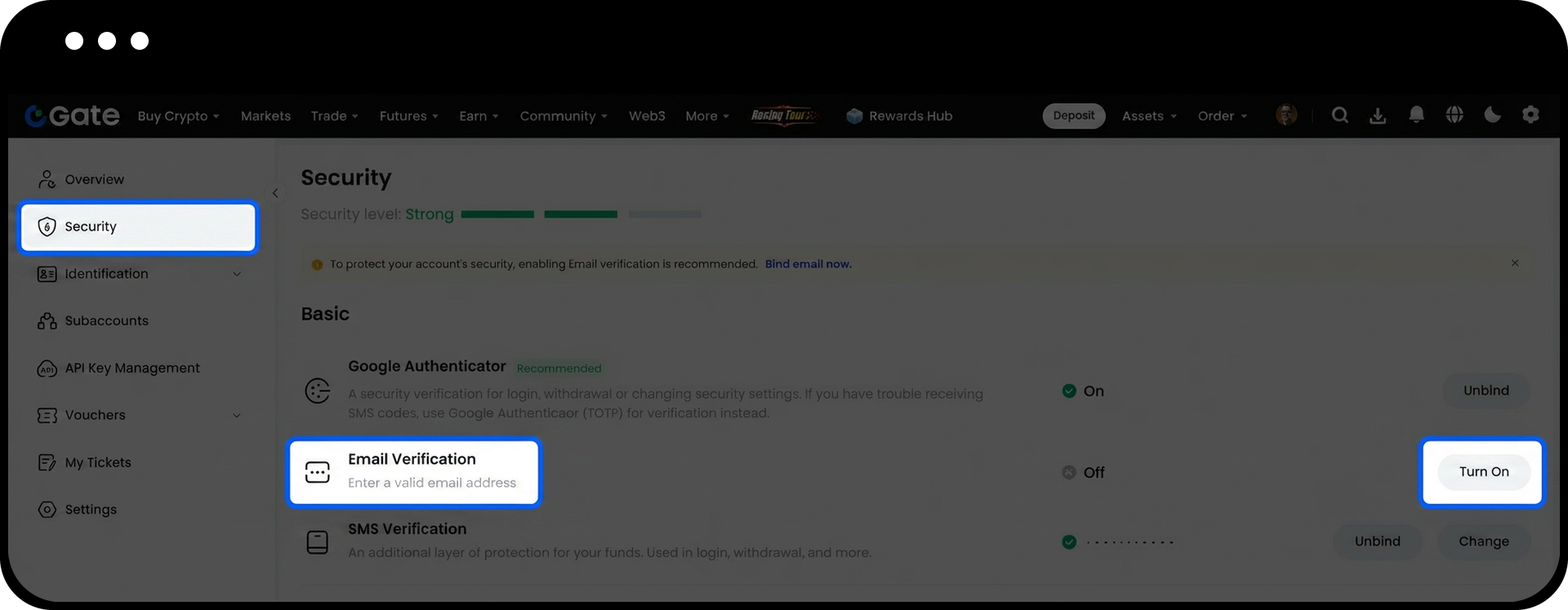
- From the dropdown menu, select Security.
- Under Basic Security Items, find Email Verification and click Turn On.
Step 2: Complete Email Binding
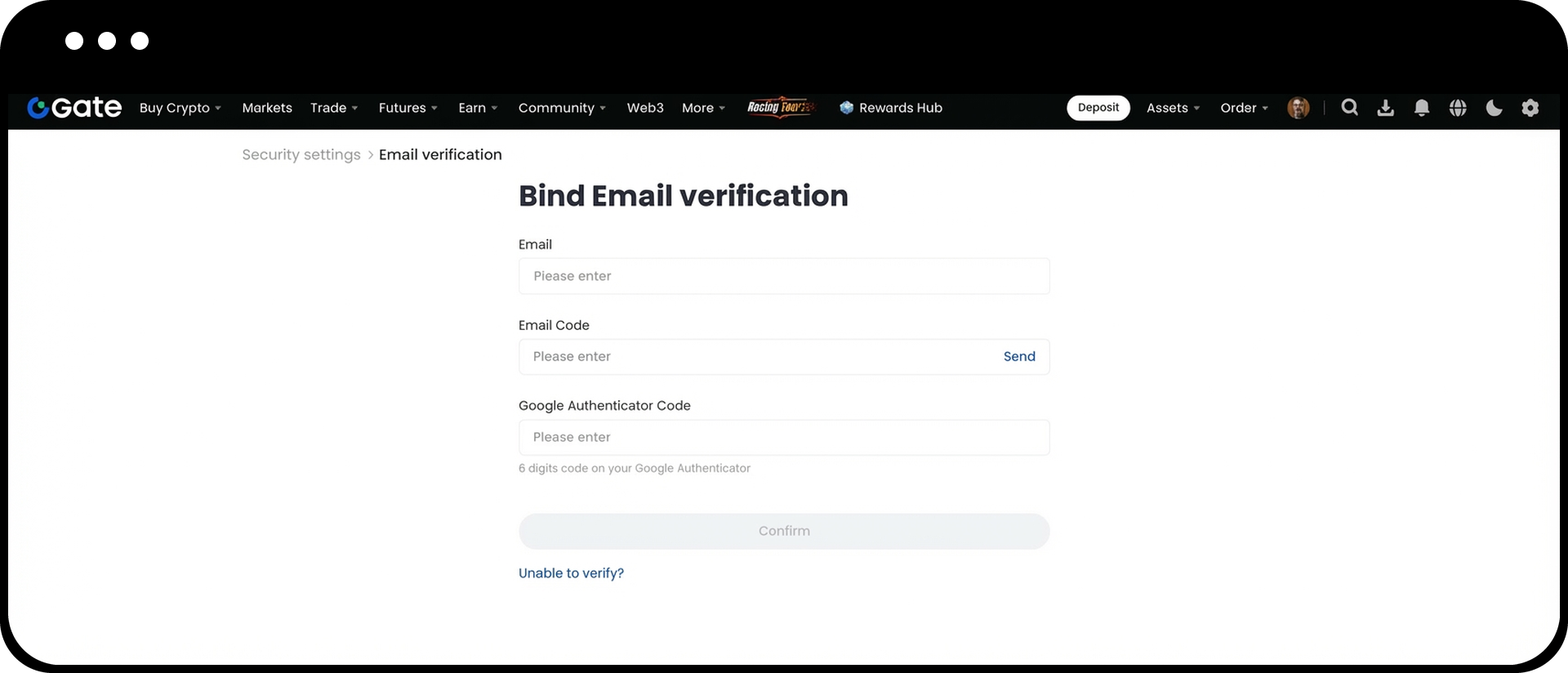
- On the binding page, enter the following information in order:
- The email address you want to bind
- The email verification code
- The SMS verification code
- After confirming all information is correct, click Confirm.
Change Email (Original Email Still Accessible)
- Log in to Gate Web.
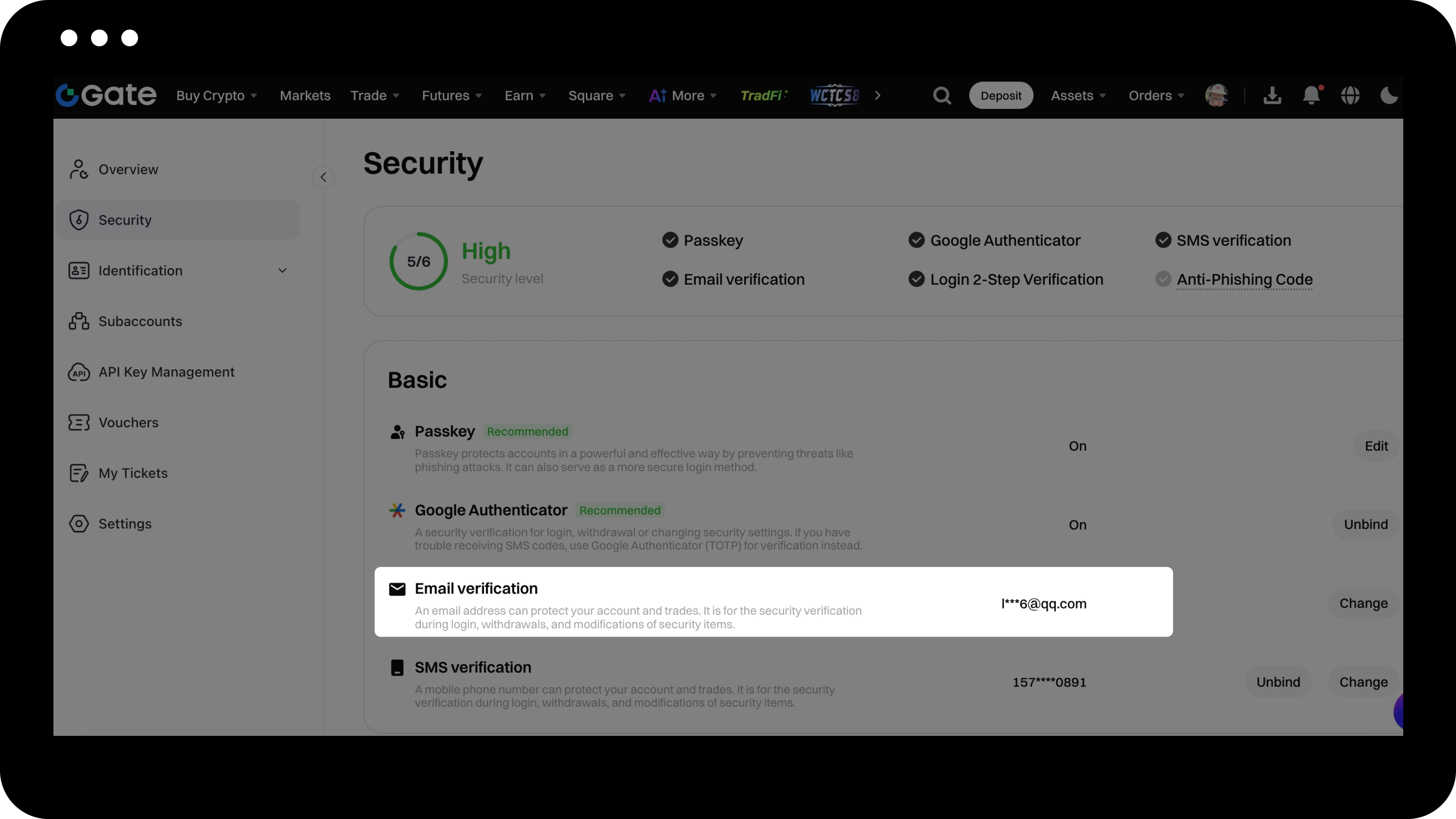
- Click your profile icon in the upper right corner > Security > Email Verification > Change.
- Follow the on-screen instructions to complete the new email binding process.
Reset Email (Email Not Accessible)
If your currently linked email address is no longer accessible, you can request to reset your email based on your account login status.
1. Account Can Log In Normally
If you can log in to your account, you can submit an email reset request directly through the "Security Reset Page."
Here’s how:
- Log in to your account (either on Web or App).
- Visit the Security Reset Page.
- Select the relevant email reset option.
- Follow the on-screen instructions to submit your request.
2. Account Cannot Log In
If you are unable to log in to your account on the Web, please submit your email reset request via the App. Currently, the Web does not support submitting an email reset request when not logged in.
Please follow these steps:
- Open the Gate App.
- Enter your email, username, or phone number and password, then tap Log In.
- When you reach the security verification page, tap "Unable to verify?" at the bottom of the page.
- Follow the on-screen instructions to submit your email change request.
Please note, the "Unable to verify?" option only appears after reaching the security verification page. If you do not reach this page, you will not be able to submit a request.
If you forgot your password, you can also apply to reset your email as follows:
- On the App login page, tap "Forgot Password".
- Enter the phone number or email linked to your account.
- Tap " Didn't receive code?".
- Select "Reset verification method" and follow the prompts to complete the email reset application.
3. Review Process
After submitting your application, we will review it as soon as possible. The result will be sent via email, so please check both your inbox and spam folder.
If you encounter any issues during the process, please contact online support for assistance.
Important Notes
- Once your email is bound, it will be used to receive account security notifications and important operation verification codes.
- When changing your email, make sure your new email can receive verification codes normally.
- When resetting your email, please ensure the information you provide is accurate and valid to facilitate a smooth review process.
- To keep your account secure, we recommend updating your binding information regularly and ensuring your email remains active.
Frequently Asked Questions
Q1: What should I do if I don't receive the email verification code?
A: Please check your spam or junk mail folder, or try using a different email address. If the issue persists, contact customer support for assistance.
Q2: Can one email be linked to multiple Gate accounts?
A: No. Each email can only be linked to one Gate account to ensure account security.
Q3: How long does it take to change my email?
A: If your original email is still accessible, the change can be completed instantly.
Q4: How long does it take to reset my email?
A: Security reset reviews are usually completed within 24 hours. The result will be sent to your new email address, so please check your inbox.
Disclaimer
The content provided herein is for reference and educational purposes only and does not constitute any financial, investment, trading, or legal advice, nor does it constitute an offer or solicitation to buy or sell any digital assets. Gate makes no express or implied representations or warranties regarding the accuracy, completeness, or timeliness of the information contained herein. Product features, interfaces, rules, and fee structures may be updated or adjusted at any time. Please refer to the latest announcements and the actual information displayed on the Gate platform for the most accurate details.
Digital asset investments involve significant risk, and prices may fluctuate substantially. You may lose the entire amount of your investment. Please make decisions cautiously based on your own financial situation and risk tolerance after fully understanding the associated risks. If necessary, you are advised to consult an independent professional financial or legal advisor.
For more information about potential risks, please refer to Gate's Risk Disclosure and User Agreement.
